FOR IPHONE + APPLE WATCH

Your wrist.
Endless possibilities.●

For the things you notice.
And the things you’re yet to discover.
Make your own tools. Make every observation count.

Find your possibility
A birdwatcher observing wildlife on a peaceful tropical wetland boardwalk
OUT THERE. IN THE MOMENT.
Wildlife Survey09:41

What did you spot?

BirdButterflyDragonflyOther
Session active ••○
Example configuration
SMALL MOMENTS. BIGGER PERSPECTIVES.Every observation counts.

A TOOL THAT TAKES YOUR SHAPE

One app.
Whatever you’re into.

Some days you’re counting birds. Others, you’re timing a drill or keeping an eye on your latest batch. Taplyho turns your Apple Watch into a personal observation instrument — built around your world.

What will you notice?

01 / EXPLORE
A birdwatcher observing a tropical wetland
THE GREAT OUTDOORS

FOLLOW YOUR CURIOSITY

Less screen.
More scene.

Keep your eyes on the treetops. A tap records a sighting; a counter keeps your tally. Add an optional location to give each observation a little more context.

QuadrantCounterOptional geotags

Your idea: a morning bird count, a trail survey, a butterfly diary.

Make it your own
ALSO AT HOME WITHTraffic countsMusic rehearsalsField notesYour next idea ↗

YOUR WRIST. YOUR RULES.

A little of this.
A little of you.

Mix instruments. Name your buttons. Choose your colours. Set exact or automatic Crown counting, add up to ten choices, and make room for a text note. Start with a template, or start with a blank canvas.

From a simple tap to an instrument full of possibilities, you decide what matters.

CHOOSE A COLOUR
My daily discoveries09:41
Try tapping the Watch•○○

Go on. Give it a tap.
Interactive example · your changes stay in this page

SMALL TOOLS. ALL SORTS OF POSSIBILITIES.

Meet your building blocks.

02 / COMBINE

12 instruments to mix, match and make your own. Five essentials with Free. The entire collection with Plus and Pro.

01

Big Button

One generous tap target. Record a timestamped observation the moment it happens.

Included in Free

And we’re just getting started.

More instruments are on the way. The next possibility could be yours.
Share your idea
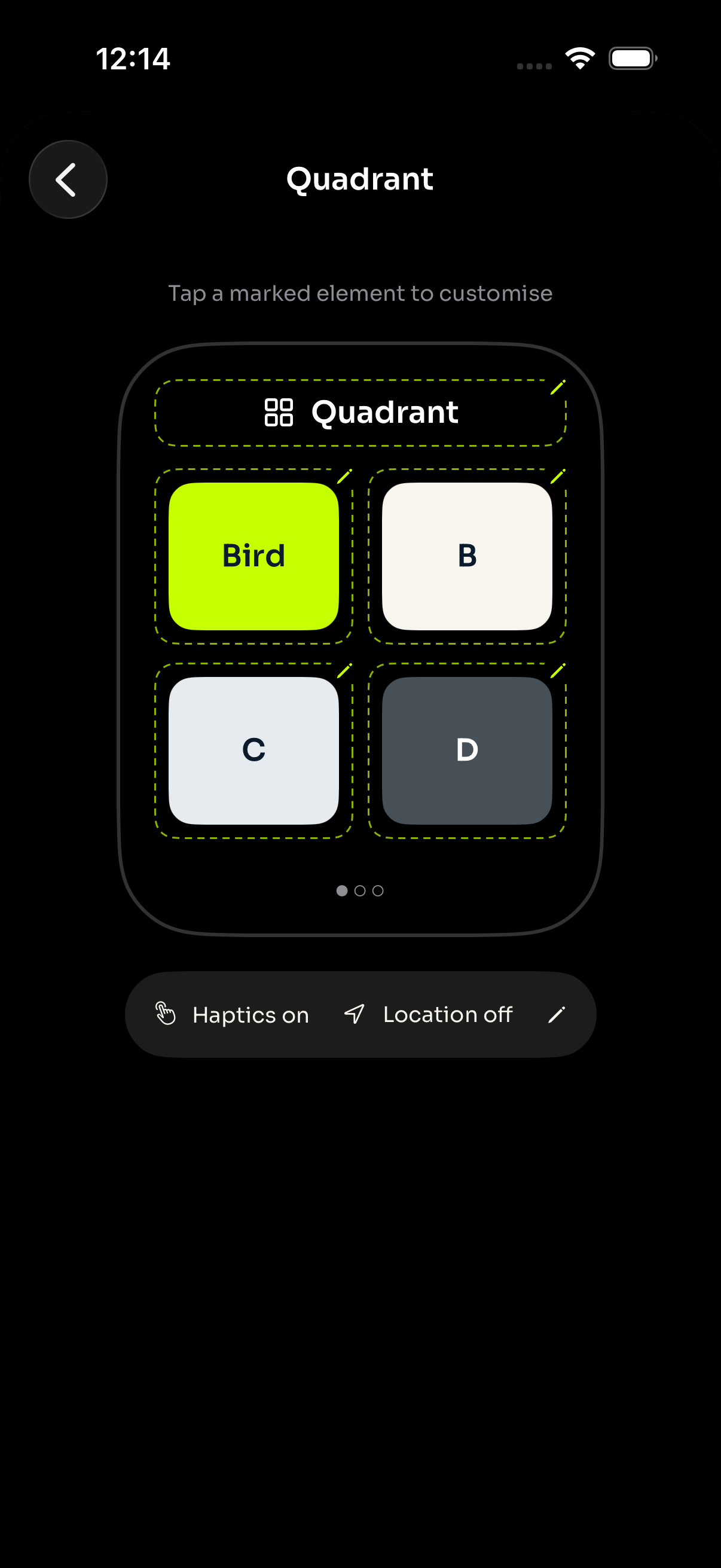
Taplyho instrument editor showing a live Quadrant Watch preview with editable labels, colours, haptics and location
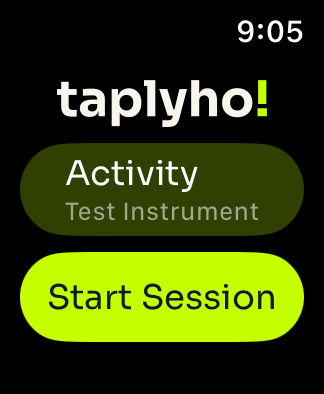
Actual Taplyho Apple Watch app screenshot showing the Activity picker and Start Session button
The iPhone instrument editor + Apple Watch app
YOUR WRIST. YOUR TOOLS. YOUR DATA.

BUILD. TAP. LOOK BACK.

Made on your phone.
In the moment
on your wrist.

  1. 01

    Build your Activity

    Pick a ready-made template or arrange your own instruments. Tap a marked element in the Watch preview to edit it right there on iPhone.

  2. 02

    Head out and record

    Start a Session on your Watch. Tap, count or time as you go — even when your phone is out of reach.

  3. 03

    Find the bigger picture

    Explore Session summaries, instrument results and your raw events on iPhone. With Plus or Pro, share a branded PDF report or export your data.

FROM SMALL OBSERVATIONS TO A BIGGER PICTURE

03 / UNDERSTAND

Every tap.
A story worth
looking back on.

The moment matters. So does what you learn from it. Taplyho brings your Session together in a clear, visual report on iPhone — with a matching PDF to keep or share.

  1. 01

    Your Session, at a glance

    Event count, elapsed time and the instruments you used, with your Session notes and recording times.

  2. 02

    A summary that fits the instrument

    Button counts and comparisons. Running counter logs. Grouped Crown turns. Accumulated timing. Pattern timelines and text word clouds.

  3. 03

    The detail is still there

    Explore the original timestamped events, with available location details and attachments. Name Sessions in History with a left swipe. Each report keeps the configuration used for that Session.

Explore a sample report

5-page PDF · synthetic example data
Reports on iPhone in every plan. PDF and data exports with Plus or Pro.

First page of a Taplyho PDF report with a Session overview, Big Button totals and Quadrant comparisons
Taplyho 0.6 report on iPhone showing Session metrics and instrument summaries
ON YOUR PHONE. ON THE PAGE.

Your Session at a glance, followed by summaries for each instrument.

TAKE YOUR OBSERVATIONS FURTHER

Print it. Share it. Work with it your way.

PDF A report to keepCSV Events & Crown turnsJSON ZIP Data & attachments

Your observations. Yours to keep.

Record locally on your Watch. Transfer to your iPhone. Sync to your private iCloud when available. No Taplyho account. No advertising SDKs. No vendor database of your observations.

iCloud backup depends on successful transfer and sync; unsent Watch data stays on that Watch.

Our privacy policy

FIND YOUR FIT

Start curious.
Go a little further.

One-time upgrades. Unlimited Sessions in every plan.
Make room for everything you’re into.

A LITTLE CURIOSITY

Free

$0

A great place to begin

1 Activity
  • 5 essential instruments
  • Customize labels and colours
  • Unlimited Sessions, history & reports
  • Offline Watch recording
  • Private iCloud sync
Start with Free
THE SWEET SPOT

MORE ROOM TO EXPLORE

Plus●

US$1.99

One-time purchase

5 Activities
  • All 12 instruments + future additions*
  • Everything in Free
  • Branded PDF, CSV & JSON exports
  • Custom template import & sharing
  • The complete feature set
Make room with Plus

FOR ALL YOUR POSSIBILITIES

Pro

US$9.99

One-time purchase

∞ Activities
  • Everything in Plus
  • Unlimited Activity capacity
  • The same complete feature set
  • Room for every experiment
  • One place for all your instruments
Go with Pro

US base prices shown; local App Store prices may vary. Upgrades are purchased in the iPhone app. Pro purchased after Plus is a separate full-price purchase; Plus is not automatically credited.

Every existing Activity uses a slot. Deleting an Activity also deletes its Sessions and data. Unlimited Sessions are subject to device storage. *More instruments are planned; specific future features and availability aren’t guaranteed.

Taplyho app icon

A MORE OBSERVANT TOMORROW

Small app.
Big possibilities.

Coming soon for iPhone and Apple Watch.
Your next discovery starts with a tap.

Ask about the launch

iOS 17 or later · watchOS 10 or later

LET’S TALK

A question?
A possibility?

Need a hand, have an instrument in mind, or want to know when Taplyho arrives? Drop us a note.

Tell us a little about what you’re trying to do. Please leave passwords and sensitive observation data out of your message.

No mailing list. Just a conversation.

YOUR DATA, WITH CARE

Privacy policy

Effective 2 November 2026

This policy describes how Taplyho handles information in the iPhone and Apple Watch app, and on taplyho.com. The app is currently preparing for release.

Your app observations

Activities, Sessions, Events and attachments are stored locally on your devices. The Watch transfers records to your paired iPhone, which syncs them to your private iCloud database when available. Taplyho does not operate a vendor database for your observations and does not require a Taplyho account. Your Apple Account and iCloud service are governed by Apple’s own privacy policy.

Data that has not successfully transferred from your Watch and synced to iCloud is not backed up there. Exported files and shared templates are under your control; the recipient or service you share them with may apply its own privacy practices.

Permissions and recordings

Microphone access is used when you choose to record an Audio Note. Location is optional and used for geotagging where permitted. Text Box instruments have geotagging enabled by default, and you can turn it off in the instrument settings. Audio transcription, where supported, is performed on the iPhone using on-device recognition; the original audio is retained. The app requests relevant permissions in context, and you can manage them in device settings.

Purchases

Apple processes in-app purchases. Taplyho uses verified StoreKit transactions to determine your plan. We do not receive your payment card details. Purchase and Apple Account information is handled by Apple.

This website

This website does not use advertising trackers or analytics scripts, and does not set application cookies. Fonts and images are served with the website. Cloudflare provides hosting and security and may process technical request information, such as IP addresses and request metadata, to deliver and protect the service.

When you contact support

The support form sends your name, reply email, selected topic and message to the operator’s support inbox through Cloudflare’s email service. This information is used to respond to your request, resolve support issues or consider feedback. It is not added to a mailing list. Your IP address is used for short-lived rate limiting to reduce spam; this application does not retain a database of form submissions.

Support correspondence remains in the support mailbox while it is needed to handle your request or maintain a relevant support record. You may request its deletion using the support form. We do not sell your personal information.

Your choices

You can change app permissions in Settings, manage iCloud through your Apple Account, and delete Activities within the app. Deleting an Activity also deletes its Sessions, Events and attachments, with deletion propagated as devices reconnect and sync. Files you previously exported or shared need to be deleted separately. Apple manages purchase records.

Questions and requests

For privacy questions, access or deletion requests, use the support form and select “Privacy request”. Please avoid including sensitive observation data. We may need to confirm your identity before acting on a request.

Changes

This page will be updated if these practices change. The effective date above identifies the current version.